

David
Moderator
- Joined
- Apr 24, 2003
- Messages
- 912
- Reason
- Other
- Diagnosis
- 00/0000
- Country
- CA
- State
- ON
- City
- Cobourg
This how-to is for registered members and covers two topics:
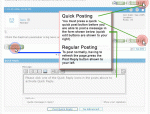
The forum software has two methods of posting to the forum, a quick-reply, and a regular post reply. The two methods are available for backwards compatibilty with older browsers.
In order to perform a quick-reply (saving you having to refresh to a new page), click the "Quick Reply" image, and then you are able to post information (please refer to images below).
If you do not click a Quick-Reply button then the editor will not allow you to enter information.
If you prefer, you can click the "Post Reply" button, the page will refresh to a new page where you can enter your post.
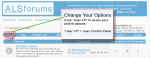
2. Accessing the Control Panel (Editing Your Options / Information)
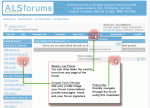
You want to access your options so you can change your avatars, personal information, member photo, forum subscriptions, and all your other options for the forum software.
If you haven't visited your Control Panel yet I strongly suggest you take the time to update your information and options.
I hope this was helpful. Feel free to add to this information.
For further reading please take a look at the official documentation for this forum software located here: http://www.vbulletin.com/docs/
- Posting Messages - Quick Post vs. Regular Post
- Access the User Control Panel to edit your account options
The forum software has two methods of posting to the forum, a quick-reply, and a regular post reply. The two methods are available for backwards compatibilty with older browsers.
In order to perform a quick-reply (saving you having to refresh to a new page), click the "Quick Reply" image, and then you are able to post information (please refer to images below).
If you do not click a Quick-Reply button then the editor will not allow you to enter information.
If you prefer, you can click the "Post Reply" button, the page will refresh to a new page where you can enter your post.
2. Accessing the Control Panel (Editing Your Options / Information)
You want to access your options so you can change your avatars, personal information, member photo, forum subscriptions, and all your other options for the forum software.
If you haven't visited your Control Panel yet I strongly suggest you take the time to update your information and options.
I hope this was helpful. Feel free to add to this information.
For further reading please take a look at the official documentation for this forum software located here: http://www.vbulletin.com/docs/
Attachments
Last edited:


